
So AI agents are the biggest thing in AI right now, and everyone wants to know how to build them. But when you search “AI agent roadmap,” you get either vague hype or a wall of framework names with no order. So where do you actually start, and what do you learn, in what order?
I make tutorials on exactly this, building local RAG apps, LangGraph agents, n8n automations, AI agents that organize your files, on my YouTube channel. So this isn’t a roadmap I copied from somewhere. It’s the path I actually teach and build with. And I’ve rebuilt it for 2026 and 2027, because the agent world moved fast, tools like MCP and the OpenAI Agents SDK weren’t even around when most roadmaps were written.
So let me give you the short version before the detail.
To build AI agents, you follow five phases. First, foundations: Python and how LLMs work. Second, the core agent skills: prompting, function calling, tool use, and memory. Third, the frameworks: LangGraph, CrewAI, and the others, plus MCP, which is the big 2026 standard. Fourth, you add RAG so your agents can use real data. And fifth, you build multi-agent systems and deploy them. Below I break down each phase step by step, with free resources (many from my own channel) and the courses I’d point you to.
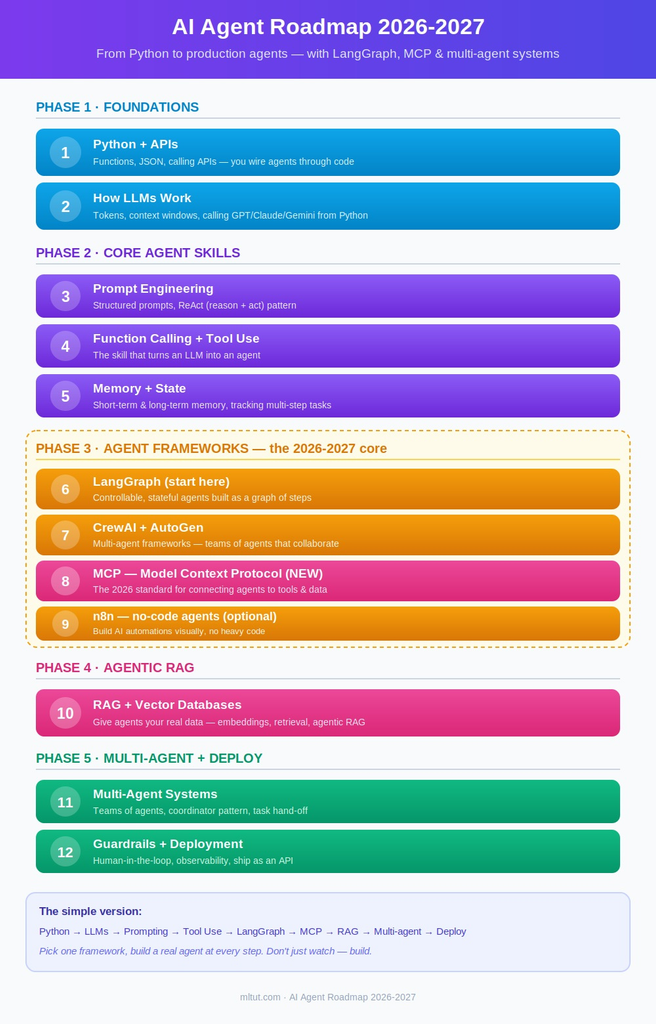
Now, without further ado, let’s get started and see the AI Agent Roadmap.
AI Agent Roadmap
- Step 1. Learn Python
- Step 2. Understand how LLMs work
- Step 3. Prompt engineering for agents
- Step 4. Function calling and tool use
- Step 5. Memory and state
- Step 6. LangGraph (start here)
- Step 7. CrewAI and AutoGen (multi-agent frameworks)
- Step 8. MCP, the Model Context Protocol (the big 2026 shift)
- Step 9. n8n and no-code agents (optional but powerful)
- Step 10. Learn RAG and vector databases
- Step 11. Build multi-agent systems
- Step 12. Add guardrails, and deploy
- Conclusion
Before discussing the AI Agent Roadmap, first let’s understand What are AI Agents-
What are AI agents? (and why 2026 is their moment)
An AI agent is a system where an LLM doesn’t just answer a question, it plans, uses tools, and takes actions on its own to complete a goal. So instead of you prompting a chatbot back and forth, an agent can decide what to do, use a tool (search the web, query a database, call an API, run code), look at the result, and decide the next step, looping until the task is done. That “think, act, observe, repeat” loop is what makes it an agent rather than a chatbot.
So this is a simple way to see it. A chatbot answers “what’s the weather?” An agent, given “book me the cheapest flight to Delhi next Friday,” can search flights, compare prices, and actually book one, using tools and making decisions along the way. That autonomy is the complete point.
And 2026 is genuinely the moment for this. LLMs got good enough to reason reliably, standards like MCP made it easy to connect agents to tools, and companies are rushing to automate real workflows with agents. So agentic AI skills are among the most in-demand and best-paid in tech right now, which is exactly why learning this roadmap is worth your time.
If you want to see what an agent actually looks like in action before you start, I built one that organizes your files automatically:
Does your problem even need an agent? (read this first)
So before you spend weeks learning to build agents, let me tell you the thing most guides skip, and it’s the honest truth every experienced agent builder will confirm: a lot of problems don’t actually need an agent.
So this is the distinction that counts. If the steps to solve your problem are known and fixed, you don’t need an agent, you need a workflow, which is just a predefined sequence of LLM calls and logic. Workflows are simpler, faster, cheaper, and far easier to debug. For example, “summarize this document, then translate it, then email it” is a fixed sequence, so it’s a workflow, not an agent.
An agent earns its complexity only when the path to the goal is genuinely uncertain, when the system has to decide what to do next based on what it finds. “Research this topic and write a report” is agent territory, because the agent doesn’t know in advance how many searches it’ll need or what it’ll find.
So why does this count for your roadmap? Because knowing when not to reach for an agent is itself a senior-level skill, and it saves you from building something slow, expensive, and flaky when a simple workflow would have worked. So as you go through this roadmap, keep asking: does this actually need an agent, or would a fixed workflow do the job? That single question will make you better at this than most people rushing to build agents for everything.
The AI agent roadmap 2026-2027 at a glance
| Phase | What you learn | Key tools |
|---|---|---|
| 1. Foundations | Python, how LLMs work | Python, OpenAI/Claude/Gemini APIs |
| 2. Core agent skills | Prompting, function calling, tool use, memory | Prompt engineering, JSON, APIs |
| 3. Agent frameworks ★ | LangGraph, CrewAI, MCP, n8n | LangGraph, CrewAI, AutoGen, MCP |
| 4. Agentic RAG | Give agents real data | Vector DBs, embeddings, RAG |
| 5. Multi-agent & deploy | Teams of agents, production | Multi-agent, guardrails, deployment |
Optional: Ollama for running agents locally, n8n for no-code automation, fine-tuning for specialized agents.
So you go phase by phase, and you can build a real, useful agent by the end of Phase 3. If you want the broader AI foundation first, my AI learning roadmap covers the wider path. This one is focused specifically on building agents.
Not sure where to start? Jump in based on where you are:
- Totally new to AI? Start at Phase 1, Step 1 (Python), and go in order.
- Already comfortable with Python and LLM APIs? Skip to Phase 2 (core agent skills) and build from there.
- Already built a simple agent? Jump to Phase 3 and pick a framework (LangGraph), then add MCP.
- Building agents already and want to go to production? Head to Phase 5 (multi-agent systems, guardrails, and deployment).
So you don’t have to do all of it from scratch, start at the phase that matches your level, and build one real thing at each step from there.
Phase 1: Foundations
Step 1. Learn Python
Every AI agent framework runs on Python, so this is non-negotiable, but the good news is you don’t need to be an expert. You need the basics plus comfort with functions, dictionaries, JSON, and calling APIs, because that’s what you’ll do constantly when wiring up agents.
If you already code, skim this and move on. If you’re new, spend a few weeks here first, it pays off across the whole roadmap.
Resources to Learn Programming
1. MLTUT FREE Python Course– YouTube 2. Introduction to Python Programming– Udacity 3. Python for Everybody– University of Michigan 4. Introduction To Python Programming– Udemy 5. Python Core and Advanced– Udemy 6. Crash Course on Python– Google 7. Python for Absolute Beginners!– Udemy 8. Python 3 Programming Specialization– University of Michigan 9. R Programming – Johns Hopkins University 10. Programming for Data Science with R– Udacity 11. R Programming A-Z™– Udemy |
Step 2. Understand how LLMs work
Agents are built on large language models, so you need to understand what they are and how to talk to them through code. Learn what tokens and context windows are, how to call an LLM from Python using an API (OpenAI, Claude, or Gemini), and how to get structured output back. This API-calling skill is the foundation of every agent you’ll build.
I break down LLMs in plain English here, worth watching before you go further:
Where to learn it:
- MLTUT Claude Code FREE Course (YouTube)
- Generative AI with Large Language Models: DeepLearning.AI & AWS
- Generative AI Specialization – DeepLearning.AI
- Complete Generative AI Course with LangChain and Hugging Face– Udemy
- Building with the Claude API– Coursera
- Gen AI Using Hugging Face Training– Coursera
For prompting specifically (which you’ll need next), Google’s Prompting Essentials is a solid cheap start, I reviewed it here.
Phase 2: The core agent skills
So before you touch a framework, you need the skills that every agent is built from. Skipping these is why people get lost in frameworks later, they never learned the fundamentals underneath.
Step 3. Prompt engineering for agents
Agents run on prompts, so writing good ones is a core skill, not an afterthought. Learn structured prompting, giving clear instructions, roles, and output formats, plus techniques like ReAct (reason + act), which is the pattern behind how most agents think. Good prompting is the difference between an agent that works and one that loops uselessly.
Where to learn it:
- Prompt Engineering for ChatGPT– Vanderbilt University
- Prompt Engineering Specialization– Coursera
- ChatGPT Masterclass: The Guide to AI & Prompt Engineering– Udemy
- Getting Started with Generative AI API Specialization– Codio
- The Complete Prompt Engineering for AI Bootcamp (2026)– Udemy
- ChatGPT Prompt Engineering for Developers– Datacamp
- Introduction to ChatGPT– Datacamp
Step 4. Function calling and tool use
This is the skill that turns an LLM into an agent. Function calling is how an LLM decides to use a tool, a web search, a calculator, a database query, an API, and gets a result back. Learn how to define tools, how the model chooses which to call, and how to feed the result back into the conversation. After you understand tool use, agents stop being a mystery and start being something you can build.
So what does a simple agent actually look like? Let me demystify it, because people imagine something far more complicated than it is. At its heart, a basic agent is a loop, and in plain terms it works like this:
- You give the LLM a goal and a list of tools it’s allowed to use (say, a web search and a calculator), each described so the model knows what it does.
- The LLM looks at the goal and decides: do I answer directly, or do I need a tool? If it needs one, it replies with the tool’s name and the input to give it.
- Your code runs that tool and gets a result, then hands the result back to the LLM.
- The LLM looks at the result and decides the next step, use another tool, or give the final answer.
- That loop repeats until the task is done.
That’s genuinely it. A simple agent is maybe 30 to 60 lines of Python around that loop, no framework needed at first. The LLM is the brain that decides, your code is the hands that run the tools, and the loop is what makes it feel autonomous. Frameworks like LangGraph just make that loop easier to build and control when your agents get complex, but the core idea is this simple. So before you touch a framework, it’s genuinely worth building one tiny agent from scratch this way, it makes everything after it click into place.
Step 5. Memory and state
A real agent remembers. Learn the difference between short-term memory (the current conversation) and long-term memory (things stored and recalled later), and how agents track state across steps. This is what lets an agent handle a multi-step task without forgetting what it already did.
I built a local RAG agent that answers from your own notes, which shows memory and retrieval working together:
Phase 3: The agent frameworks (the 2026-2027 core)
So this is where it gets real, and where the biggest changes have happened for 2026 and 2027. You could build agents from scratch with just API calls, but frameworks make it far easier. The trick, and every honest guide says this, is do not try to learn all of them. Pick one, build with it, then branch out. Let me walk you through the ones that actually count now.
Step 6. LangGraph (start here)
LangGraph is the framework I’d start with in 2026. Let me explain what it actually does, because “build agents as a graph” sounds abstract until you see the point of it.
The problem with simple agent loops (like the one above) is they’re hard to control, the LLM can go off in unpredictable directions, and when something breaks, you can’t tell where. LangGraph fixes this by letting you design your agent as a graph: each step is a node (call the LLM, use a tool, check a condition), and the connections between them decide what happens next. So instead of one free-form loop, you get a clear, controllable flow you can see, debug, and add checkpoints to. It also manages state properly, your agent remembers what happened at each node, and you can even pause it, have a human approve a step, and resume.
That control is why LangGraph became the standard for serious agent work, and it’s what a lot of production agents run on. So it’s the one I’d learn first, after you’ve built a simple agent by hand and felt why the control is needed.
I explain LangGraph simply and show building your first agent locally:
Courses:
- Udacity’s AI Agents with LangChain and LangGraph is an excellent structured path (it covers LangGraph, state management, and RAG), and
- DeepLearning.AI’s short AI Agents in LangGraph course on Coursera is taught by LangChain’s own founder. Both are great starting points.
Step 7. CrewAI and AutoGen (multi-agent frameworks)
After you can build a single agent, these frameworks let you build teams of them. CrewAI is built around agents with roles collaborating on a task, one researches, one writes, one reviews. AutoGen (now AG2) does similar multi-agent conversations. Learn one of these when you’re ready for agents that work together, which is a big 2026-2027 trend.
Step 8. MCP, the Model Context Protocol (the big 2026 shift)
This is the one your old roadmap could not have covered, because it’s new and it’s a genuine game-changer. Let me actually explain how MCP works, because it’s your biggest advantage to understand it properly while most guides just name-drop it.
MCP, the Model Context Protocol, is a standard introduced by Anthropic for how agents connect to tools and data. So here is the problem it solves. Before MCP, every time you wanted your agent to use a tool, a database, a file system, an API, you wrote custom code to connect it, and everyone did it differently. It was messy and nothing was reusable. MCP fixes that with a simple client-server idea: a tool provider builds an MCP server (which exposes tools, data, or resources in a standard way), and your agent is an MCP client that can connect to any MCP server and instantly use what it offers. No custom glue code.
So the practical effect is huge: once something speaks MCP, any agent can use it. There are already MCP servers for GitHub, databases, file systems, Slack, and hundreds more, and your agent can plug into all of them the same way. That’s why MCP has become one of the most important things to understand in agentic AI for 2026 and 2027, it’s turning agent-to-tool connections from custom one-offs into a plug-and-play ecosystem. So don’t skip it, understanding MCP is genuinely what separates someone building agents the 2026 way from someone still on the old approach.
I cover MCP servers in my Gemini CLI automation tutorial:
Courses: Coursera’s Agentic AI Engineering specialization covers LangGraph, MCP, and multi-agent systems together, and it’s one of the most current structured paths for 2026.
Step 9. n8n and no-code agents (optional but powerful)
Not every agent needs to be coded from scratch. n8n is a workflow-automation tool that lets you build AI agents and automations visually, connecting apps, triggers, and AI steps without heavy code. It’s genuinely useful for real-world automation and for building things fast, and it’s blown up in 2026.
I show how to install n8n and build your first AI workflow:
Phase 4: Agentic RAG (give your agents real data)
So a plain agent only knows what its LLM was trained on. To make an agent that knows about your documents, your company, or current data, you add RAG, retrieval-augmented generation. This is one of the most valuable and most-used agent skills in 2026.
Step 10. Learn RAG and vector databases
Learn how RAG works: you turn your documents into embeddings (vectors), store them in a vector database, and when the agent needs to answer, it retrieves the most relevant chunks and uses them. Then learn agentic RAG, where the agent actively decides what to retrieve and can reformulate its own queries, which is the smarter, newer version.
I’ve got a full RAG series, start with what RAG actually is:
And this is building a local RAG app step by step:
Courses: DataCamp and Coursera both have solid RAG courses, and the Udacity LangGraph course above covers agentic RAG well.
Phase 5: Multi-agent systems and deployment
Step 11. Build multi-agent systems
This is where you combine everything, multiple agents working together on complex tasks. A content pipeline where one agent researches, another writes, a third reviews. Learn the coordinator pattern (one agent directing others) and how agents hand off tasks. Be warned, multi-agent systems bring new problems, cost (every agent call burns tokens), latency, and hard debugging, so budget extra time here.
Step 12. Add guardrails, and deploy
The last step is making agents safe and putting them into the real world. Learn guardrails (limits that stop agents doing something harmful or going off the rails), human-in-the-loop approval (where a person confirms key actions), and observability (logging what your agent did so you can debug it). Then deploy, wrap your agent in an API, host it, and monitor it. This is what separates a demo from a real product.
I made a video on why agents fail in production and how to fix hallucinations, essential before you ship:
The best free way to learn AI agents (my honest take)
So do you need to pay for a course? Honestly, no, not to start. A huge amount of the best agent learning is free, and I say that as someone who publishes free agent tutorials myself. My YouTube channel walks through building real agents, local RAG apps, LangGraph agents, n8n automations, MCP servers, step by step and free. DeepLearning.AI’s short courses are free and excellent. And the framework docs (LangGraph, CrewAI) are genuinely good.
So my honest advice: start free. Follow along building real agents from free tutorials (mine and others), and only pay for a structured course if you want a guided, all-in-one path with a certificate, or you tried self-teaching and stalled. When you do want that structure, the Udacity and Coursera agentic courses above are the strongest current options.
Common mistakes people make learning AI agents
So I see the same mistakes over and over, so let me save you from them.
Jumping to frameworks before the fundamentals. People start with LangGraph before understanding tool use and prompting, then get lost. Learn Phase 2 first, it makes the frameworks click into place.
Trying to learn every framework. LangChain, LangGraph, CrewAI, AutoGen, MCP, it’s overwhelming, and you don’t need all of them. Pick LangGraph, build something real, then add others when a project needs them.
Building nothing. You cannot learn agents by watching. Build a small agent, one with a clear goal and two tools it can choose from, a research assistant that searches the web and summarizes is the perfect first project. You learn more from one working agent than ten tutorials.
Ignoring cost and reliability. Agents burn tokens and fail in ways chatbots don’t. Learn guardrails and keep an eye on cost early, it’s part of the skill.
What can you build with AI agents?
So what’s the payoff? After this roadmap you can build real, useful agents, and these also double as portfolio pieces, which is what actually gets you hired. These are the kinds of agents worth building, roughly from easiest to most impressive:
- A research assistant that takes a topic, searches the web, and writes a summarized report with sources. This is the perfect first project, small enough to finish in a weekend, complex enough to teach you the whole loop.
- A document-processing agent that reads your PDFs or notes and answers questions about them (this is RAG in action).
- A customer-support agent that answers questions from a company’s own knowledge base and escalates to a human when unsure.
- A workflow-automation agent (great with n8n) that connects apps and handles a repetitive business task end to end.
- A coding assistant that reviews code, writes tests, or fixes bugs.
- A multi-agent system where several agents collaborate, one researches, one writes, one reviews, which is the most impressive thing you can show.
So don’t just collect these ideas, build two or three of them. A portfolio of real, working agents on your GitHub is worth more than any certificate, because it proves you can actually ship, which is exactly what employers screen for in 2026.
What jobs and salaries does this lead to?
And the jobs are real and genuinely well-paid, so let me give you actual numbers, because “well-paid” is vague. AI agent engineer, agentic AI developer, and AI automation specialist are among the fastest-growing, best-paid roles in tech for 2026 and 2027, as companies race to automate workflows with agents. In fact, agent-engineering pay is climbing more than twice as fast as average tech salaries.
So here are the 2026 numbers in the US (they vary by source, level, and location, so treat these as ranges):
- Entry-level agentic AI engineers earn roughly $100,000 to $135,000 a year.
- Mid to senior agentic AI engineers average around $147,000 to $190,000 base, with top earners past $240,000, and total compensation (base plus equity plus bonus) at top companies going far higher.
- At frontier labs and hot agent startups, packages for the best agent engineers reach $500,000 to $1,000,000+ total comp, this is a small top tier, but it shows how sharply this skill is repriced.
And freelance and consulting demand is strong, arguably the best freelance track in AI right now, because businesses want custom agents built and don’t have the skills in-house yet. Independent AI agent developers commonly charge $80 to $250+ an hour, and senior multi-agent specialists command $150 to $300 an hour, with fixed-scope projects running from around $15,000 to $75,000+ each. Around 60% of new enterprise software projects now include an agentic component, so the demand is broad and growing.
One honest, important note on what employers actually want in 2026, and it’s good news if you follow this roadmap. Just listing “LangChain” on your resume no longer impresses anyone, it’s a baseline expectation now, and it doesn’t prove you can ship. What genuinely stands out are LangGraph and MCP, they’re explicitly the differentiators that command higher pay, and MCP server authoring is described as the steepest-rising skill demand of 2026. So the fact that this roadmap centers LangGraph and MCP isn’t an accident, it’s aimed squarely at what the highest-paying roles actually screen for. What gets you hired is proof you can build and evaluate real agent systems, not just prototype them, which is exactly why the “build real projects” advice throughout this roadmap is so important.
So this roadmap leads somewhere genuinely valuable, strong salaries, the strongest freelance track in AI, and skills that are only getting more in demand through 2026 and 2027.
FAQ
And that’s all for AI Agent Roadmap.
Conclusion
So that’s the complete AI agent roadmap for 2026 and 2027. Foundations in Python and LLMs, the core skills of prompting and tool use, the frameworks (LangGraph, CrewAI, and MCP), agentic RAG, and finally multi-agent systems and deployment. The biggest thing to remember, learn the fundamentals before the frameworks, pick one framework and build with it, and build real agents as you go.
And you don’t have to do it alone or pay a fortune, a lot of this is free, including the tutorials on my YouTube channel where I build these agents step by step. So start with Python, watch a few of the videos above, and build your first small agent this week. That’s how you actually learn this.
If you’re on the journey or building something with agents, tell me in the comments. I read and reply to every one, and I love seeing what people build.
You May Also Be Interested In
Best Resources to Learn Computer Vision (YouTube, Tutorials, Courses, Books, etc.)- 2026
Best Certification Courses for Artificial Intelligence- Beginner to Advanced
Best Natural Language Processing Courses Online to Become an Expert
Best Artificial Intelligence Courses for Healthcare You Should Know in 2026
What is Natural Language Processing? A Complete and Easy Guide
Best Books for Natural Language Processing You Should Read
Augmented Reality Vs Virtual Reality, Differences You Need To Know!
What are Artificial Intelligence Examples? Real-World Examples
Thank YOU!
Explore more about Artificial Intelligence.
Thought of the Day…
‘ It’s what you learn after you know it all that counts.’
– John Wooden

Written By Aqsa Zafar
Aqsa Zafar is a Ph.D. scholar in Machine Learning at Dayananda Sagar University, specializing in Natural Language Processing and Deep Learning. She has published research in AI applications for mental health and actively shares insights on data science, machine learning, and generative AI through MLTUT. With a strong background in computer science (B.Tech and M.Tech), Aqsa combines academic expertise with practical experience to help learners and professionals understand and apply AI in real-world scenarios.