
Hi, I’m Aqsa Zafar, the founder of MLTUT and a Ph.D. scholar in Machine Learning. I’m passionate about sharing what I know and my personal experiences to help others grow and succeed in their learning journeys. When I first heard about the Google Prompting Essentials Course, I was really curious and excited to explore how it could improve my skills in using AI tools effectively. In this blog, I’ll give you a detailed Google Prompting Essentials Course Review. I’ve broken it into clear, easy-to-follow sections. I’ll talk about what I learned, the parts I really liked, and how this course might be useful for you.
As a researcher in Natural Language Processing, I wanted to see how well Google translates prompt-engineering theory into practical, everyday use. I completed the full course, including all assignments, and tested its methods in my own AI research workflow.
Quick version first, so you don’t have to scroll.
Is Google Prompting Essentials worth it? Yes, if you are new to AI and you want a fast, structured way to write better prompts and actually get good results from tools like Gemini and ChatGPT. It is short, around 6 to 10 hours. It costs $49 a month on Coursera with a 7-day free trial. It needs no coding. And it runs on free Gemini, so you don’t pay for any AI tool. You get a certificate from Google at the end. But if you already prompt confidently and know things like few-shot and chain-of-thought, it is going to feel too basic. So skip it.
Start Google Prompting Essentials on Coursera (7-day free trial) →
Now, without further ado, let’s get started with Google Prompting Essentials Course Review–
Google Prompting Essentials Course Review
- Quick verdict at a glance
- What is Google Prompting Essentials?
- Is Google Prompting Essentials worth it?
- Is it worth paying when free prompt guides exist?
- The 5-step prompting framework (what you actually learn)
- How I tested this course
- My experience, course by course
- What I loved, and where it fell short
- Who should take this course, and who should skip it
- How much does Google Prompting Essentials cost?
- What you'll be able to do after the course
- Is the Google Prompting Essentials certificate worth it?
- My final rating
- Final Recommendation
- FAQs
- Conclusion
Quick verdict at a glance
| My rating | 4.6 / 5 for beginners 2 / 5 if you already prompt well |
| Rating on Coursera | 4.8 ★ from 7,866 reviews 376,478+ enrolled |
| Best for | Beginners who want to write better AI prompts fast |
| Cost | $49/month on Coursera (most finish in one month) 7-day free trial |
| Time | ~6–10 hours, self-paced |
| Coding | None |
| AI tool needed | None, runs on free Gemini |
| You get | A shareable certificate from Google |
| Skip it if | You already prompt confidently (few-shot, chain-of-thought) |
What is Google Prompting Essentials?
So Google Prompting Essentials is a short, beginner-level program on Coursera, built by Google. It teaches you how to write good prompts. A prompt is just the clear, specific instruction you give an AI so it gives you what you actually want. And the whole course is built around one simple 5-step framework you can reuse with any AI tool.
And this is the part people don’t realise. It runs entirely on free Gemini, and a Google AI Pro trial is included. So unlike a lot of AI courses, you don’t need to pay for any separate tool to do the exercises. You just pay the one Coursera fee. Quite nice.
It is a specialization made of short courses. People search for it as both a “course” and a “specialization,” but it is the same program. And it ends with a certificate from Google you can put on LinkedIn. It is built for complete beginners. No coding, no technical background needed.
So these are the 4 courses inside it, in order:
- Start Writing Prompts like a Pro (2 hours): the 5-step framework and the basics.
- Design Prompts for Everyday Work Tasks (1 hour): emails, brainstorming, tables, summarising.
- Speed Up Data Analysis and Presentation Building (1 hour): insights from data, spreadsheets, visualizations.
- Use AI as a Creative or Expert Partner (2 hours): prompt chaining, chain-of-thought, and AI agents.
That is around 6 hours of video across the four, and under 10 hours in total once you add the hands-on activities.
Now you might be wondering how this is different from Google’s other AI course. So here it is. Google AI Essentials is the broad “what is AI and how do I use it at work” program. Prompting Essentials is the focused one that goes deep on prompting only. I reviewed Google AI Essentials separately here if you are stuck between the two. Short version? AI Essentials for a broad overview. Prompting Essentials if you specifically want to get good at prompting.
Is Google Prompting Essentials worth it?
So is it worth it? It depends on where you are right now. If your prompting is hit-or-miss and you want a reliable method, yes, it is worth it. If you already prompt well, no, it is a waste. That is the honest split.
So think about how you use AI now. Do you use ChatGPT or Gemini and sometimes get great answers, and sometimes get useless ones, and you are not sure why? This course fixes exactly that. The 5-step framework gives you a repeatable way to get good results on purpose, not by luck. For a beginner or a non-technical professional, that is genuinely useful. And $49 for one month is a fair price for it.
But if you already know how to give context, use examples, and chain prompts together, you already know most of this. The course itself says it is beginner-level. So don’t pay to be taught things you already do every day.
Is it worth paying when free prompt guides exist?
So this is the real question, right? There are a hundred free prompt tutorials on YouTube and Google even has a free prompting guide. So why pay $49?
Fair question. And here is my honest answer after doing the course.
Free guides give you tips. This gives you a system. That is the actual difference. On YouTube you get ten scattered tricks with no order, and you never really know if you are doing it right. This course gives you one framework, in order, with hands-on activities where you actually practice and get it wrong and fix it. That structure is the thing free content almost never has.
You also get two things free guides can’t give you. A certificate from Google, which the free stuff won’t. And graded, hands-on exercises, so you are not just watching, you are doing and checking.
So this is how I would decide. If you are the kind of person who can teach yourself from scattered free videos and you don’t need a certificate, save your money and use the free guides. Honestly, you can. But if you want a proper structured path, real practice, and something for your resume, the $49 for one month is worth it. For me, the structure alone saved me the hours I would have wasted piecing free tips together.
The 5-step prompting framework (what you actually learn)
So the core of the course is a 5-step method for writing prompts. And this is the thing you will keep using long after the course is over. I won’t give away the whole course, but the idea is simple. A good prompt is not one line. You build it. Google’s framework has 5 steps, and they are task, context, references, evaluate, and iterate. So you say the task you want done, you give context, you add references or examples where they help, you evaluate what the AI gives back, and then you iterate on it instead of just accepting the first thing it hands you.
And the big lesson for me? How much the small details change everything. Adding the tone I wanted, or one line of context the AI could not have guessed, turned okay answers into genuinely good ones. That one habit alone, saying the context out loud instead of assuming the AI knows it, is worth the price on its own.
And it goes past the basics too. You get prompt chaining, where you break a big task into a series of prompts. You get multimodal prompting, using text and images together. And it teaches you to check AI outputs for mistakes and bias, which most people skip. You shouldn’t.
How I tested this course
So I did not just watch it. I took Google Prompting Essentials over six days, about an hour a day. I did all four hands-on assignments. And I used the techniques in my actual work as an ML researcher.
And I got two real results. I used the 5-step framework to summarise my PhD research abstracts, and it cut my writing time by about 30%. Then I tested prompt chaining to generate follow-up questions for my students during my machine learning lectures, and it worked really well. So this is not theory for me. I put it through my own work, and that is what the course notes below come from.
My experience, course by course
Course 1: Start Writing Prompts like a Pro (learning the basics)
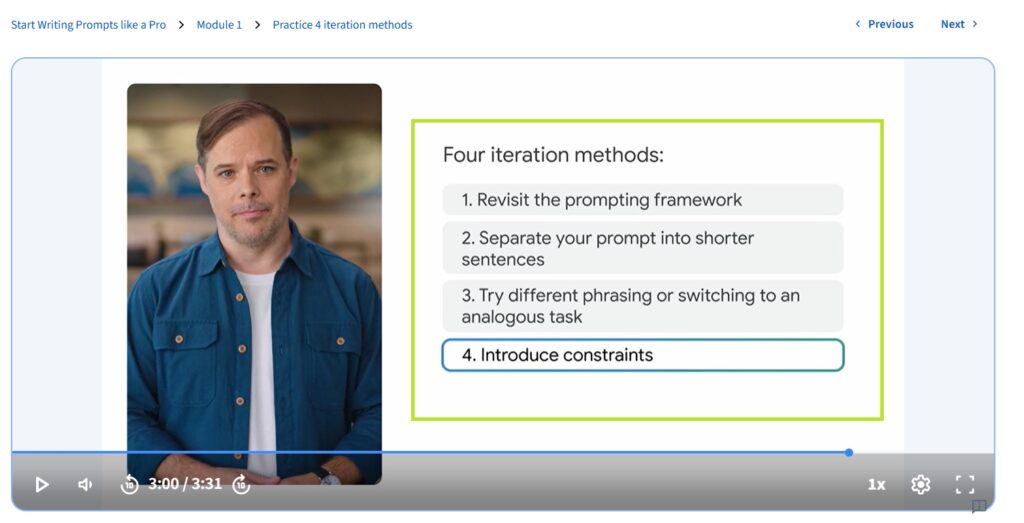
This is where the 5-step framework is taught. What I liked: the videos are short and genuinely easy to follow, even for a total beginner, and the practice examples (planning a vacation, brainstorming) made it stick.
My big takeaway was that adding small details like tone and context made a huge difference in the quality of what the AI gave back.
What I’d improve: I wanted more practice assignments, and a couple of the framework steps could be explained in more depth for people completely new to this.
Course 2: Design Prompts for Everyday Work Tasks
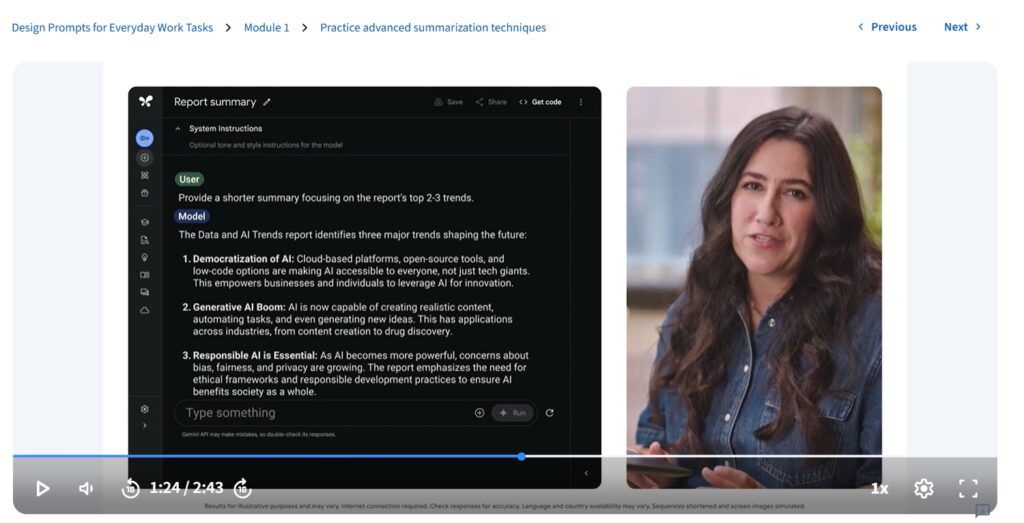
This one’s about speed on daily work: drafting emails fast, summarising long documents in seconds, building trackers and tables.
The activity I enjoyed most was writing the same email for two different audiences, and watching one small prompt change make one version formal and the other friendly.
Big takeaway: AI saves serious time on repetitive tasks, but only if your instructions are clear and precise. I’d have liked slightly more advanced examples and some tips on handling common AI mistakes.
Course 3: Speed Up Data Analysis and Presentation Building
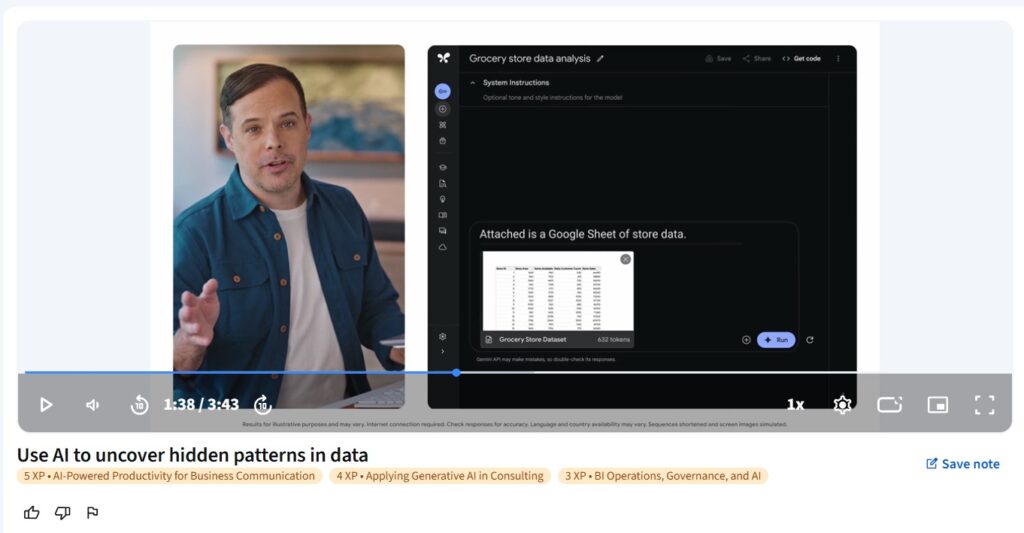
This was my favorite, because data is a big part of my work. You learn to spot patterns in data, create visualizations, and prep whole presentations including speaker notes.
Big takeaway: AI speeds up analysis a lot, but you still have to review the results carefully for accuracy. What I’d add: deeper, more complex data techniques and better handling of large, messy datasets, which is where it got a little thin for me.
Course 4: Use AI as a Creative or Expert Partner (advanced techniques)
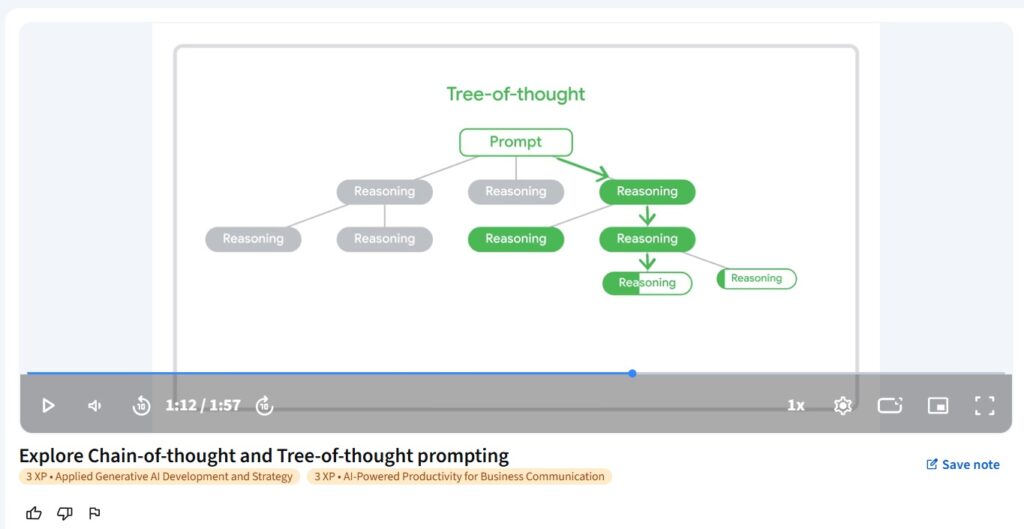
The one that expanded how I use AI most. Prompt chaining, breaking a big task into small AI-completed steps, made complex problems manageable. And building custom AI agents, personalities that role-play or give expert feedback, was genuinely fun and useful.
The coolest thing I did was create an AI agent to simulate a Q&A session on my research topic, and it helped me generate fresh ideas I hadn’t thought of.
Big takeaway: AI can become a real teammate, but it all comes down to how thoughtfully you design the prompt.
What I loved, and where it fell short
What I loved. It is genuinely beginner-friendly, and the examples are easy to relate to. But the best part? I could use what I learned right away. The hands-on activities made it feel real instead of abstract. The self-paced format let me go at my own speed. And the Google certificate at the end is a nice addition to my profile.
Where it fell short. If you already have AI experience, it will feel basic. The course does not hide that. There is no coding or model-building, so it won’t help you become an AI engineer. And in the data course especially, I wanted more advanced examples.
Who should take this course, and who should skip it
Take it if you are curious about AI and don’t know where to start. Or you want to get your daily tasks done faster with AI. Or you are new to prompting and want a simple method that actually works. It is perfect for students, non-technical professionals, and anyone who wants to get more out of ChatGPT or Gemini.
Skip it if you already prompt fluently and know few-shot and chain-of-thought cold. Or you want the technical AI-engineer path with Python, APIs, and model-building. This course teaches you to use AI well. Not to build it.
How much does Google Prompting Essentials cost?
So it is $49 a month on Coursera. And now the money-saving bit most reviews skip. It is a short course you can finish in under 10 hours. So you can do the whole thing inside one month and pay just once. There is also a 7-day free trial, so a fast learner could knock out a big chunk of it for free.
One smart tip. Since it is just one short course, if you have Coursera Plus, this is already included, along with thousands of other courses for the same monthly price. So if you plan to take more than just this one, Plus is better value than paying $49 for this alone. And either way, financial aid is there on Coursera if the fee is a stretch for you.
Start the 7-day free trial on Coursera →
What you’ll be able to do after the course
So let me make this concrete, because “you’ll learn prompting” does not tell you much.
After this course, you will be able to write a prompt that gets you a usable first draft instead of a generic one. You will be able to take a big, messy task and break it into a chain of prompts the AI can actually handle. You will be able to point AI at a set of data and get patterns and a visualization out of it. You will be able to build a custom AI agent that role-plays or gives you expert feedback. And you will walk away with your own library of reusable prompts, so next time you are not starting from a blank box.
So the end state is not “I watched a course on prompting.” It is “I can sit down, write a prompt the right way, and get something I can actually use.” That is the real payoff, and it is why the hands-on practice counts for more than the videos.
Is the Google Prompting Essentials certificate worth it?
So you get a shareable certificate from Google when you finish. And it is a fair addition to your LinkedIn or resume, as a sign that you have built real, structured AI skills. In 2026, where AI fluency is more and more expected, that sign does carry some value.
But be realistic. I say this on every review because it is true. No completion certificate gets you hired on its own. It is not an accredited qualification. What actually helps you is being able to do the thing. And the reusable prompts and habits you build here are worth way more than the certificate line. So treat the certificate as a small bonus, and the skill as the real prize.
Now on the practical side, since people ask. When you finish, you add it to your LinkedIn under licenses and certifications, and it shows as “Google Prompting Essentials” issued by Google, with a link anyone can click to verify it is real. So it shows up as a genuine, checkable credential, not just a line you typed. Will a recruiter hire you for it alone? No. But paired with actually using AI well in your work, it is a small, honest signal that you took the time to learn this properly, and in 2026 that is worth having on your profile.
My final rating
After completing the whole course and using it in real work, here’s my honest breakdown:
- Content: 4.5/5: the 5-step framework is practical and reusable, though it could use more advanced case studies.
- Instruction: 5/5: taught clearly by Google’s AI experts, conversational and beginner-perfect.
- Hands-on practice: 5/5: you finish with a collection of reusable prompts you can actually use.
- Flexibility: 4.5/5: self-paced and accessible, just short if you want depth.
- Value for money: 5/5: at $49 for a month, with the skills applying across data, content, and business work, it’s strong value.
So overall? For a beginner, it is an easy yes. For an experienced AI user, it is not.
Final Recommendation
I highly recommend the Google Prompting Essentials course to anyone interested in getting started with generative AI. Whether you’re a student, professional, or entrepreneur, this course equips you with the foundational knowledge and practical skills needed to use AI tools effectively. The combination of a self-paced format, hands-on exercises, and expert instruction ensures that you’ll gain useful insights that you can immediately apply in your work.
If you’re new to AI or looking to boost your productivity with generative tools, this course is an excellent starting point. With its practical focus, valuable skills, and reasonable price, it’s a great investment for anyone eager to integrate AI into their day-to-day tasks.
FAQs
Now, it’s time to wrap up this “Google Prompting Essentials Course Review“.
Conclusion
In this Google Prompting Essentials Course Review, I’ve shared my experience of learning how to use AI tools more effectively. The course is designed for beginners and helps you understand how to give clear instructions to AI, which is called “prompting.” It covers everything from basic skills to more advanced techniques, making it a great way to get started with AI.
The Google Prompting Essentials Course Review shows that the course offers a practical, hands-on approach. You’ll be able to apply what you learn right away, whether you’re writing emails, analyzing data, or creating presentations. The course gives you the skills to use AI tools confidently in real-life situations.
Overall, this Google Prompting Essentials Course Review highlights that the course is a valuable resource for anyone interested in learning about AI. It’s perfect for beginners and anyone looking to be more productive with AI tools, with clear lessons, helpful assignments, and a certificate to show off your new skills.
If you’ve taken it and want to share how it went, drop a comment. I read and reply to every one, and real experiences help the next person decide.
Start Google Prompting Essentials (7-day free trial) →
You May Also Be Interested In
Best Resources to Learn Computer Vision (YouTube, Tutorials, Courses, Books, etc.)- 2026
Best Certification Courses for Artificial Intelligence- Beginner to Advanced
Best Natural Language Processing Courses Online to Become an Expert
Best Artificial Intelligence Courses for Healthcare You Should Know in 2026
What is Natural Language Processing? A Complete and Easy Guide
Best Books for Natural Language Processing You Should Read
Augmented Reality Vs Virtual Reality, Differences You Need To Know!
What are Artificial Intelligence Examples? Real-World Examples
Thank YOU!
Explore more about Artificial Intelligence.
Thought of the Day…
‘ It’s what you learn after you know it all that counts.’
– John Wooden

Written By Aqsa Zafar
Aqsa Zafar is a Ph.D. scholar in Machine Learning at Dayananda Sagar University, specializing in Natural Language Processing and Deep Learning. She has published research in AI applications for mental health and actively shares insights on data science, machine learning, and generative AI through MLTUT. With a strong background in computer science (B.Tech and M.Tech), Aqsa combines academic expertise with practical experience to help learners and professionals understand and apply AI in real-world scenarios.